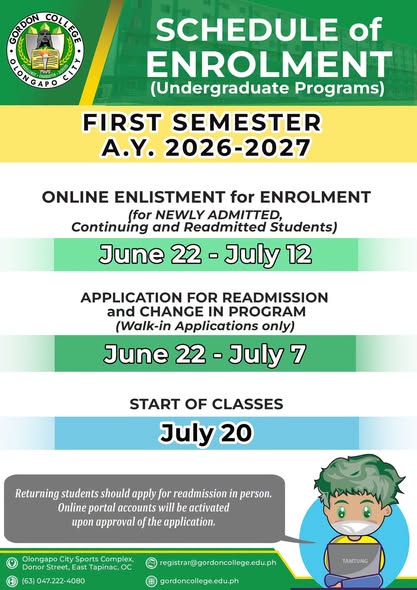
๐๐ฎ๐ง๐ ๐๐ – ๐๐ฎ๐ฅ๐ฒ ๐๐, ๐๐๐๐
(๐๐๐ ๐๐ธ๐๐ฟ๐ ๐ด๐ท๐๐ผ๐๐๐ธ๐ท ๐๐ก๐ข๐๐๐๐ก๐ , ๐ถ๐๐๐ก๐๐๐ข๐๐๐ ๐๐๐ ๐ ๐๐๐๐๐๐ก๐ก๐๐ ๐๐ก๐ข๐๐๐๐ก๐ )
๐๐ฎ๐ง๐ ๐๐ – ๐๐ฎ๐ฅ๐ฒ ๐, ๐๐๐๐
Application for Readmission and Change in Program
(๐๐๐๐-๐๐ ๐ด๐๐๐๐๐๐๐ก๐๐๐๐ ๐๐๐๐ฆ)
๐๐ฎ๐ฅ๐ฒ ๐๐, ๐๐๐๐
Start of Classes
๐๐๐ก๐: ๐ ๐๐ก๐ข๐๐๐๐๐ ๐ ๐ก๐ข๐๐๐๐ก๐ ๐ โ๐๐ข๐๐ ๐๐๐๐๐ฆ ๐๐๐ ๐๐๐๐๐๐๐ ๐ ๐๐๐ ๐๐ ๐๐๐๐ ๐๐. ๐๐๐๐๐๐ ๐๐๐๐ก๐๐ ๐๐๐๐๐ข๐๐ก๐ ๐ค๐๐๐ ๐๐ ๐๐๐ก๐๐ฃ๐๐ก๐๐ ๐ข๐๐๐ ๐๐๐๐๐๐ฃ๐๐ ๐๐ ๐กโ๐ ๐๐๐๐๐๐๐๐ก๐๐๐.
__________________________________________________
๐๐๐๐๐๐ ๐๐๐๐๐๐๐๐๐ ๐๐๐๐๐๐๐๐๐๐ ๐๐๐๐๐๐๐๐๐
๐๐๐๐๐ ๐๐๐๐๐๐๐๐ ๐๐๐๐๐๐๐๐
Newly Admitted Students should confirm their admission in the GCA Portal AND have submitted the complete enrolment requirements to the Office of the Registrar to be able to proceed to this process.
1. Log-on to the student portal https://gordoncollegeccs.edu.ph/gces/student using the credentials used in the GCA portal.
๐๐๐ก๐: ๐ด โ๐๐๐๐๐๐ก ๐๐๐ ๐ ๐ค๐๐๐ ๐๐๐๐ข๐๐ ๐กโ ๐๐๐ก๐๐๐ ๐๐ ๐๐ฃ๐๐๐๐๐๐๐ ๐๐ ๐๐๐ ๐ ๐๐ ๐ก๐๐๐ข๐๐๐ ๐๐๐๐๐๐๐ ๐๐.
2. Update your profile.
3. Update academic and enlistment information.
4. Read the Gordon College General Data Privacy Notice and click the CHECKBOX.
6. Click โENLISTโ button.
7. Completing all the steps above will register you for enrolment. Your schedule of classes will be posted in your GCES account on or before the start of classes. You may ask the assistance of your program coordinator for class schedule matters.
๐๐๐๐๐๐๐๐๐๐ ๐๐๐ ๐๐๐๐๐๐๐๐๐๐ ๐๐๐๐๐๐๐๐
1. Log-on to the GCES portal: (https://gordoncollegeccs.edu.ph/gces/student)
๐๐๐ก๐: ๐ด โ๐๐๐๐๐๐ก ๐๐๐ ๐ ๐ค๐๐๐ ๐๐๐๐ข๐๐ ๐กโ ๐๐๐ก๐๐๐ ๐๐ ๐๐ฃ๐๐๐๐๐๐๐ ๐๐ ๐๐๐ ๐ ๐๐ ๐ก๐๐๐ข๐๐๐ ๐๐๐๐๐๐๐ ๐๐.
2. Check the Dashboard for the online clearance status.
๐๐๐ข ๐ค๐๐๐ ๐๐๐ก ๐๐ ๐๐๐๐ ๐ก๐ ๐๐๐๐๐๐๐ ๐ค๐๐กโ ๐กโ๐ ๐๐๐๐๐ ๐ก๐๐๐๐ก ๐๐๐๐๐๐ ๐ ๐ข๐๐ก๐๐ ๐ฆ๐๐ข ๐๐๐ ๐๐๐๐๐๐๐ ๐๐ ๐๐๐ ๐๐๐๐๐ข๐๐ก๐๐๐๐๐๐ก๐๐๐ .
3. View your academic records in the following menu:
a. Term Grade
b. Summary of Grades
c. Academic Evaluation Sheet
4. Click Profile/Enlistment.
To request for change of information, visit the Office of the Registrar.
5. Update academic and enlistment information.
6. Select preferred courses to enrol.
7. Read the Gordon College General Data Privacy Notice and click the CHECKBOX.
8. Click โENLISTโ button.
9. Completing all the steps above will register you for enrolment.
๐๐๐ข๐ ๐ ๐โ๐๐๐ข๐๐ ๐๐ ๐๐๐๐ ๐ ๐๐ ๐ค๐๐๐ ๐๐ ๐๐๐ ๐ก๐๐ ๐๐ ๐ฆ๐๐ข๐ ๐บ๐ถ๐ธ๐ ๐๐๐๐๐ข๐๐ก ๐๐ ๐๐ ๐๐๐๐๐๐ ๐กโ๐ ๐ ๐ก๐๐๐ก ๐๐ ๐๐๐๐ ๐ ๐๐ . ๐๐๐ข ๐๐๐ฆ ๐๐ ๐ ๐กโ๐ ๐๐ ๐ ๐๐ ๐ก๐๐๐๐ ๐๐ ๐ฆ๐๐ข๐ ๐๐๐๐๐๐๐ ๐๐๐๐๐๐๐๐๐ก๐๐ ๐๐๐ ๐๐๐๐ ๐ ๐ ๐โ๐๐๐ข๐๐ ๐๐๐ก๐ก๐๐๐ .